· patched
SSH Multiplexing and Master Mode
Reuse a single TCP connection for many SSH sessions: master mode, control sockets, and the config options that make it automatic.
- Networking
- Snippets
- Unix
When using SSH bastion hosts it is common to set up new connections throughout the day, for many of the use cases discussed in the Tunnelling and Port Forwarding post. Normally we would start a new TCP connection for each one of them. However, open TCP connections are a finite resource on any machine, and each one of them takes some time to set up.
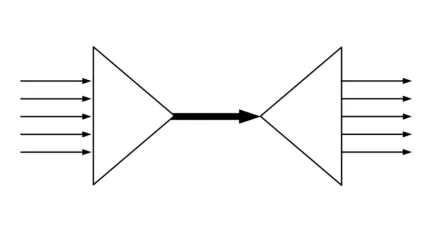
Multiplexing is a feature provided by SSH which alleviates these problems. It allows a single TCP connection to carry multiple SSH sessions. The TCP connection will be established and kept alive for a specific period of time and new SSH sessions will be established over that connection.
It works by creating a “control socket” file which will be used every time we want to start a new connection.
We need to pass two command line arguments in order to leverage this feature:
-Menables the sharing of multiple sessions over a single TCP connection, or enables “Master Mode”.-Sspecifies the control socket file which will be used or created (SSH will create it for you on that path).
Example: we can open a tunnel in master mode with:
$ ssh -M -S ~/.ssh/my-socket -L <port>:server:<port> user@jump-hostThe socket file should be kept somewhere safe, like the ~/.ssh folder.
Then we could set up dynamic port forwarding on the same bastion host with:
$ ssh -M -S ~/.ssh/my-socket -D <port> user@jump-hostwithout paying the cost of setting up a new connection.
This is also useful when we don’t have a jump host but want to run lots of commands over SSH repeatedly on the same server.
We can close the TCP connection (and any SSH connection still alive with it) by using the -O option with the exit command:
$ ssh -S ~/.ssh/my-socket -O exit user@jump-hostIn general, the -O flag allows us to pass any command to an active multiplexing master process. Other valid commands are:
checkto verify that the master process is runningforwardto request forwardings without command executioncancelto cancel any forwardingsexitwhich requests the master process to exitstopto tell the master process to not accept any further multiplexing requests
More information is available on the ssh man page.
Due to the flexibility and ease of use of this variety of commands, I often use master mode when needing to set up, check health and tear down tunnels in automation scripts (it is much nicer than running it as a background process and then killing its PID when no longer needed).
Configuration equivalent
We can also specify that we would like to use master mode in our ~/.ssh/config, for example:
Host bastion
  Hostname bastion-host
  ControlPath ~/.ssh/my-socket
  ControlMaster auto
  ControlPersist 10m

Host 172.16.*
  ProxyJump bastion
will allow us to use the bastion host in multiplexing mode for all connections to an IP address matching the pattern.
The options mean the following:
ControlPathis an equivalent to-S, and specifies the control socket file which will be used or createdControlPersistallows us to specify for how long the master TCP connection should be kept active when it is idle. It has no command line equivalentControlMasteractivates the master mode. When written in config file, more than one value is possible:- “yes” – makes SSH listen for connections on the control socket
- “auto” – tries to use a master connection, but falls back to creating a new one if one does not already exist
- “no” – the default; disables master mode
- more on the SSH man page
Restrictions
From the SSH documentation:
X11 and ssh-agent forwarding is supported over these multiplexed connections, however the display and agent forwarded will be the one belonging to the master connection i.e. it is not possible to forward multiple displays or agents.